
23ai Vector Search & RAG

Introduction
In my previous post, 23ai Vector / Semantic Search in APEX, I described how to incorporate 23ai Vector Search into your APEX Applications. In this post, I will take this solution further and explain how to combine Vector Search with Generative AI to build a Retrieval-Augmented Generation (RAG) solution.
What is RAG?
Retrieval-augmented generation (RAG) is a technique in natural language processing (NLP) that combines retrieval-based methods with generative models to produce more accurate, contextually relevant, and up-to-date responses. The core idea behind RAG is to enhance the capabilities of large language models (LLMs) by providing access to external knowledge sources during the response generation process (this is where 23ai comes in).
For this post, we will create a RAG solution for APEX Developer Blogs. We will use 23ai Vector Search to return chunks of blog posts relevant to the user's search and then send them to Open AI along with a prompt asking it to answer the user's question using the blog chunks as inspiration.
Where We Left Off
In the previous post, we broke the blog posts into manageable chunks using the VECTOR_CHUNKS function, used the VECTOR_EMBEDDING function to create Vector Embeddings for these chunks, and finally used the VECTOR_DISTANCE function to perform a semantic search on the blog posts.
Incorporating RAG
What we are looking to achieve in this post is to use a semantic search from the previous post and send the search result text chunks to Open AI to answer the user's questions. The diagram below illustrates the process, and I will review each numbered step as we progress through this post.
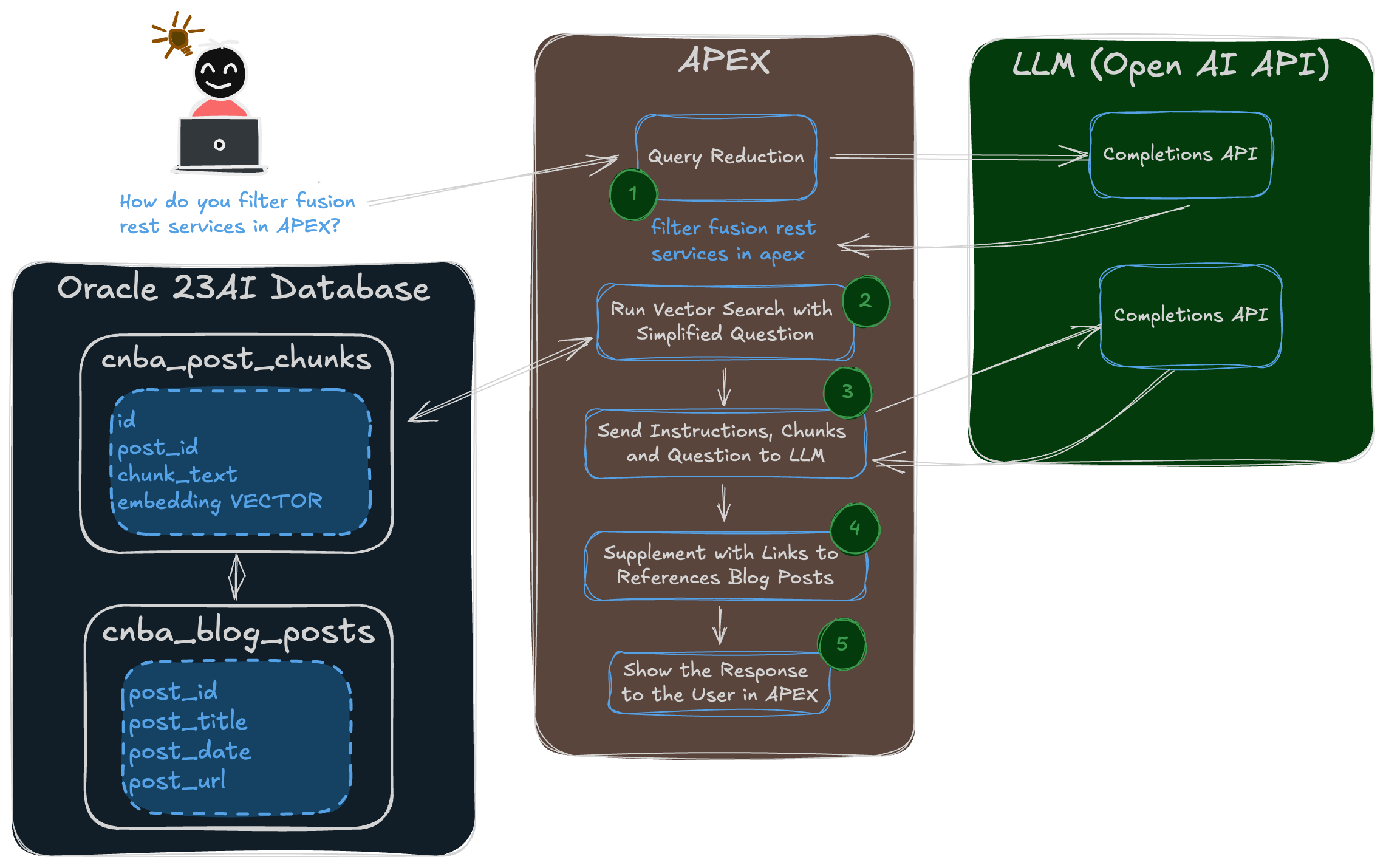
1 Query Reduction
The first challenge is the user’s question. For APEX developer blogs, we may have questions like this:
Explain APEX Template Components to me.
How do you filter fusion rest services in APEX?
Can APEX be used to Extend Oracle Fusion Applications?
The problem is that the text in questions often includes words like ‘Explain’, ‘How do you’, and ‘Can’, which clutter up the Vector Search query with unnecessary words and make it less accurate.
We still want to send the user’s complete question to Open AI, but we want a simplified version for use in the Vector Search. The good news is that AI can do this for us! All we need to do is provide with the correct instructions.
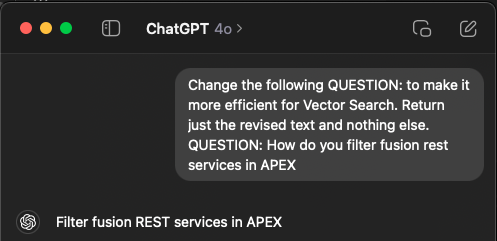
Obviously, we need to send the question to a REST API instead of typing it into Chat GPT, but you get the point.
If we take the three questions from above, after query reduction, we get the following text to use for Vector Search:
APEX Template Components
filter fusion rest services in APEX
Extend Oracle Fusion Applications with APEX
Which Model Should I Use for Query Reduction
I did some testing using various Open AI models and found the more advanced models like gpt-4o are much better at doing query reduction. The less advanced models do not do a very good job of providing simplified text for the vector search that still contains the essential search terms.
2 Run Vector Search
I covered Vector Search in my previous post, so I won’t go through it again here.
3 Send Instructions, Chunks, & the Question to Open AI
In this step, we will send the original question, the chunks of relevant text returned from the vector search, and instructions to Open AI. Before we can do this, we need to take some time to construct a prompt to tell Open AI what we want it to do with the various pieces.
Here is the prompt that I came up with:
INSTRUCTIONS:
You are an expert on Oracle technology. Answer the users QUESTION: using the BLOG POSTS: text below. Always Include the number enclosed in ##number## to reference sources used from the included BLOG POSTS:. Prioritize the content of the BLOG POSTS: when determining your answer.
QUESTION:
Can APEX be used to Extend Oracle Fusion Applications?
BLOG POSTS:
##2272# I enjoyed returning to the APEX Alpe Adria conference...
##2357# Oracle APEX is a low-code development tool which is...
##3383# Introduction Oracle APEX and Visual Builder are the go-to...
...
The
INSTRUCTIONS:tell the AI what I want it to do.The
QUESTION:is simply the user’s original question.The
BLOG POSTS:section is where I include the chunks returned from the vector search. The##ID##Values are the blog post IDs of the blogs from which the chunks were taken. Including these IDs allows me to instruct the AI to return them in the response when it has used one of the chunks.
How Many Chunks?
There are physical limitations to the prompt size you can send to an LLM. For example, the Open AI gpt-4o model has a context window of 128,000 tokens. An approximate rule of thumb is four characters per token, making the maximum prompt size about 512,000 characters. There are several reasons to stay well below this limit, however:
Cost Increase: The API charges are based on the number of tokens processed, including the prompt and the response. A larger prompt means more tokens are consumed, leading to higher costs.
Slower Response Times: Larger prompts require more processing time, resulting in slower response speeds. This can affect the overall performance and user experience, especially in real-time applications.
Less Focused Output: The model might struggle to discern what is most important if the prompt is excessively large or contains unnecessary information. This can dilute the relevance of the generated completion, resulting in more generic or off-target responses.
To balance these factors, it is worth experimenting with the number of vector search result chunks you send in the prompt.
4 Supplement with Links to Referenced Posts
As I eluded in step 3, I asked Open AI to include the blog post IDs from the chunks in its response. This allows me to process the response and generate a list of references, including the blog post name and a link to the blog post.
5 Show the Response to the User
The final step is to show the response, including the references to the user.
The Code
Main Function
Now that we have reviewed the approach, let's dig into the code that made it happen. Most of the heavy lifting is performed by the following PL/SQL function:
FUNCTION rag_blog_chunks
 (p_question   IN VARCHAR2,
  p_months_ago IN NUMBER,
  p_max_chunks IN NUMBER,
  p_max_bytes  IN NUMBER,
  p_ai_model   IN VARCHAR2,
  p_ai_temp    IN NUMBER,
  p_qr_model   IN VARCHAR2,
  p_ai_qr_temp IN NUMBER) RETURN VARCHAR2 IS

  CURSOR cr_content (cp_question_vector IN VECTOR) IS
    WITH vs AS
     (SELECT cbp.post_id
      ,      cbc.id       AS chunk_id
      ,      cbc.chunk_text
      ,      vector_distance (cbc.embedding, cp_question_vector) AS vector_distance
      FROM   cnba_post_chunks cbc
      ,      cnba_blog_posts  cbp
      WHERE  cbp.post_id = cbc.post_id
      AND    cbp.post_published_date_utc > (SYSDATE - NUMTOYMINTERVAL(p_months_ago, 'MONTH')))
    SELECT vs.post_id
    ,      vs.chunk_id
    ,      vs.chunk_text
    ,      vs.vector_distance
    FROM   vs
    ORDER BY vector_distance
    FETCH EXACT FIRST p_max_chunks ROWS ONLY WITH TARGET ACCURACY 95;

  l_question_vector  VECTOR;
  l_chunks           CLOB;
  l_openai_params    JSON;
  lr_rag_search      cnba_rag_searches%ROWTYPE;
  lr_rag_search_dtl  cnba_rag_search_dtls%ROWTYPE;
  l_start_time       NUMBER;
  l_end_time         NUMBER;

BEGIN

  l_start_time := DBMS_UTILITY.GET_TIME;
  -- Capture Parameter Values.
  lr_rag_search.ai_model        := p_ai_model;
  lr_rag_search.ai_temp         := p_ai_temp;
  lr_rag_search.max_chunks      := p_max_chunks;
  lr_rag_search.max_bytes       := p_max_bytes;
  lr_rag_search.question        := p_question;
  lr_rag_search.ai_qr_model     := p_qr_model;
  lr_rag_search.ai_qr_temp      := p_ai_qr_temp;
  -- Assign Constant containing the AI Instructions.
  -- Also known as the system prompt, these instructions tell Open AI
  --  what you want it to do.
  lr_rag_search.ai_instructions := GC_AI_INSTRUCTIONS;

  -- Call AI to Perform the Query Reduction
  lr_rag_search.search_text := query_reduction
   (p_original_question => p_question,
    p_qr_model          => p_qr_model,
    p_qr_temp           => p_ai_qr_temp);
  l_end_time := DBMS_UTILITY.GET_TIME;
  lr_rag_search.remove_question_cs := l_end_time - l_start_time;
  l_start_time := DBMS_UTILITY.GET_TIME;

  -- Create Header Record to Log Details of the Search.
  INSERT INTO cnba_rag_searches VALUES lr_rag_search
    RETURNING id INTO lr_rag_search.id;

  -- Convert the question to a Vector.
  SELECT vector_embedding (ALL_MINILM_L12_V2 USING lr_rag_search.search_text AS DATA)
    INTO l_question_vector;

  -- Perform the vector Search and build a CLOB of Vector Chunks from the Vector Search Results.
  lr_rag_search_dtl.search_id := lr_rag_search.id;
  FOR r_content IN cr_content (cp_question_vector => l_question_vector) LOOP
    lr_rag_search_dtl.vector_distance := r_content.vector_distance;
    lr_rag_search_dtl.chunk_id        := r_content.chunk_id;
    l_chunks := l_chunks || TO_CLOB(' ##' || r_content.post_id || '## ' || chr(10)) || r_content.chunk_text;
    -- Create record to log result of Rag Search.
    INSERT INTO cnba_rag_search_dtls VALUES lr_rag_search_dtl;
    IF DBMS_LOB.GETLENGTH(l_chunks) > p_max_bytes THEN
      -- Stop when we reach the max size for the prompt.
      EXIT;
    END IF;
  END LOOP;
  l_end_time := DBMS_UTILITY.GET_TIME;
  lr_rag_search.vector_search_cs := l_end_time - l_start_time;
  l_start_time := DBMS_UTILITY.GET_TIME;

  -- Build the complete text to send to Open AI.
  l_openai_params := openai_params_json (p_ai_model => p_ai_model, p_ai_temp => p_ai_temp);
  lr_rag_search.ai_prompt := TO_CLOB(lr_rag_search.ai_instructions) ||
                             TO_CLOB('QUESTION:'|| chr(10) || p_question || chr(10)) ||
                             TO_CLOB('BLOG POSTS:' || chr(10)) || l_chunks;

  -- Call Open AI API to Answer the users Question.
  l_openai_params := openai_params_json (p_ai_model => p_ai_model, p_ai_temp => p_ai_temp);
  lr_rag_search.ai_response := dbms_vector.utl_to_generate_text (data => lr_rag_search.ai_prompt, params => l_openai_params);
  l_end_time := DBMS_UTILITY.GET_TIME;
  lr_rag_search.ai_completion_cs := l_end_time - l_start_time;
  l_start_time := DBMS_UTILITY.GET_TIME;

  -- Extract Post IDs from the Response and Substitute with Post Name and Link to Post.
  generate_references (x_ai_response => lr_rag_search.ai_response);
  l_end_time := DBMS_UTILITY.GET_TIME;
  lr_rag_search.finalize_cs := l_end_time - l_start_time;

  -- Update Header Record with Responses and Timings.
  apex_debug.info ('%s > Before Update Timings [%s]', lc_log_module);
  UPDATE cnba_rag_searches
  SET    ai_response      = lr_rag_search.ai_response
  ,      ai_prompt        = lr_rag_search.ai_prompt
  ,      ai_completion_cs = lr_rag_search.ai_completion_cs
  ,      vector_search_cs = lr_rag_search.vector_search_cs
  ,      finalize_cs      = lr_rag_search.finalize_cs
  WHERE  id = lr_rag_search.id;

  -- Return the Response to the users question.
  RETURN lr_rag_search.ai_response;

END rag_blog_chunks;
-- Constants defined in the package specification.

  -- Query Reduction Prompt used to simplify original query with query optimized
  --   for vector search.
  GC_QR_PROMPT_TPL       CONSTANT VARCHAR2(1000) :=
    'Change the following QUESTION: to make it more efficient for Vector Search. '||
    'Return just the revised text and nothing else.'|| chr(10) || 'QUESTION: #QUESTION#';

  -- System Prompt providing Open AI with instructions on what you want it
  --   to do with the blog post chunks.
  GC_AI_INSTRUCTIONS     CONSTANT VARCHAR2(1000) :=
    'INSTRUCTIONS:'|| chr(10) ||
    'You are an expert on Oracle technology. ' ||
    'Answer the users QUESTION: using the BLOG POSTS: text below. ' ||
    'Always Include the number enclosed in ##number## to reference sources used from the included BLOG POSTS:. ' ||
    'Prioritize the content of the BLOG POSTS: when determining your answer.' || chr(10);
This function is called from APEX, which passes in the question along with several parameters. This allows me to experiment with different options to see which produces the best results.
Below are the three functions and procedures referenced by the above function:
Query Reduction Function
This function calls Open AI to perform the query reduction.
FUNCTION query_reduction
 (p_original_question IN VARCHAR2,
  p_qr_model          IN VARCHAR2,
  p_qr_temp           IN NUMBER) RETURN VARCHAR2 IS

  l_openai_params  JSON;
  l_ai_response    VARCHAR2(32767);
  l_prompt         VARCHAR2(32767);

BEGIN
  -- Build the prompt for the call to Open AI to simplify the users question.
  l_prompt        := REPLACE(GC_QR_PROMPT_TPL, '#QUESTION#', p_original_question);
  -- Build the paraneters for Open AI.
  l_openai_params := openai_params_json (p_ai_model => p_qr_model, p_ai_temp => p_qr_temp);
  -- Call Open AI to simplify the users question.
  l_ai_response   := dbms_vector.utl_to_generate_text (data => l_prompt, params => l_openai_params);
  RETURN l_ai_response;
END query_reduction;
Notice I am using dbms_vector.utl_to_generate_text to call Open AI.
Open AI Parameters Function
This function builds the JSON we need to call dbms_vector.utl_to_generate_text:
FUNCTION openai_params_json
 (p_ai_model IN VARCHAR2,
  p_ai_temp  IN NUMBER DEFAULT 0.5) RETURN JSON IS
  l_params_obj    json_object_t := json_object_t();
BEGIN
  l_params_obj.put('provider', 'openai');
  l_params_obj.put('credential_name', 'OPENAI_CRED');
  l_params_obj.put('url', 'https://api.openai.com/v1/chat/completions');
  l_params_obj.put('model', p_ai_model);
  l_params_obj.put('temperature', p_ai_temp);
  RETURN json(l_params_obj.to_String());
END openai_params_json;
Generate References Procedure
This procedure looks through the response from Open AI, substitutes the blog post IDs enclosed in ##post_id## with a reference, and appends the references along with the post name and a link to the end of the response.
PROCEDURE generate_references
 (x_ai_response IN OUT NOCOPY VARCHAR2) IS

  l_post_id       VARCHAR2(50);
  l_occurrence    PLS_INTEGER  := 1;
  l_post_title    cnba_blog_posts.post_title%TYPE;
  l_post_url      cnba_blog_posts.post_url%TYPE;
  l_reference     VARCHAR2(15);
  l_references    VARCHAR(2000);
  l_new_link      VARCHAR(1000);

BEGIN

  -- Extract Post IDs enclosed in ##id## and Substitute with
  --  the Blog Post Name and a Link to the Post.
  LOOP
    -- Extract the Blog Post ID values enclosed in ##id##
    l_post_id := REGEXP_SUBSTR(x_ai_response, '##(.*?)##', 1,
                               l_occurrence, NULL, 1);
    -- Exit the loop if no more references are found.
    EXIT WHEN l_post_id IS NULL;
    BEGIN
      -- Get details of the referenced Blog Post.
      SELECT post_title, post_url
      INTO   l_post_title, l_post_url
      FROM   cnba_blog_posts
      WHERE  post_id = TO_NUMBER(l_post_id);
      -- Change Post ID to Reference in the main respponse.
      l_reference := ' [^'||l_occurrence||']';
      x_ai_response  := REPLACE (x_ai_response, '##' || l_post_id ||
                                 '##', l_reference);

      -- Add the post name and link to to the footnotes text.
      l_new_link  := '[' || l_post_title || ']('|| l_post_url||')';
      l_references := l_references || l_reference || ':' ||
                      l_new_link || chr(10);
    END;
    l_occurrence := l_occurrence + 1;
    -- Limit to a Max of 10 references.
    IF l_occurrence > 10 THEN
      EXIT;
    END IF;
  END LOOP;

  -- Append the References to the end of the response from AI.
  x_ai_response := x_ai_response || TO_CLOB(chr(10) ||
                   '#### References' || chr(10) || l_references);

END generate_references;
The End Result
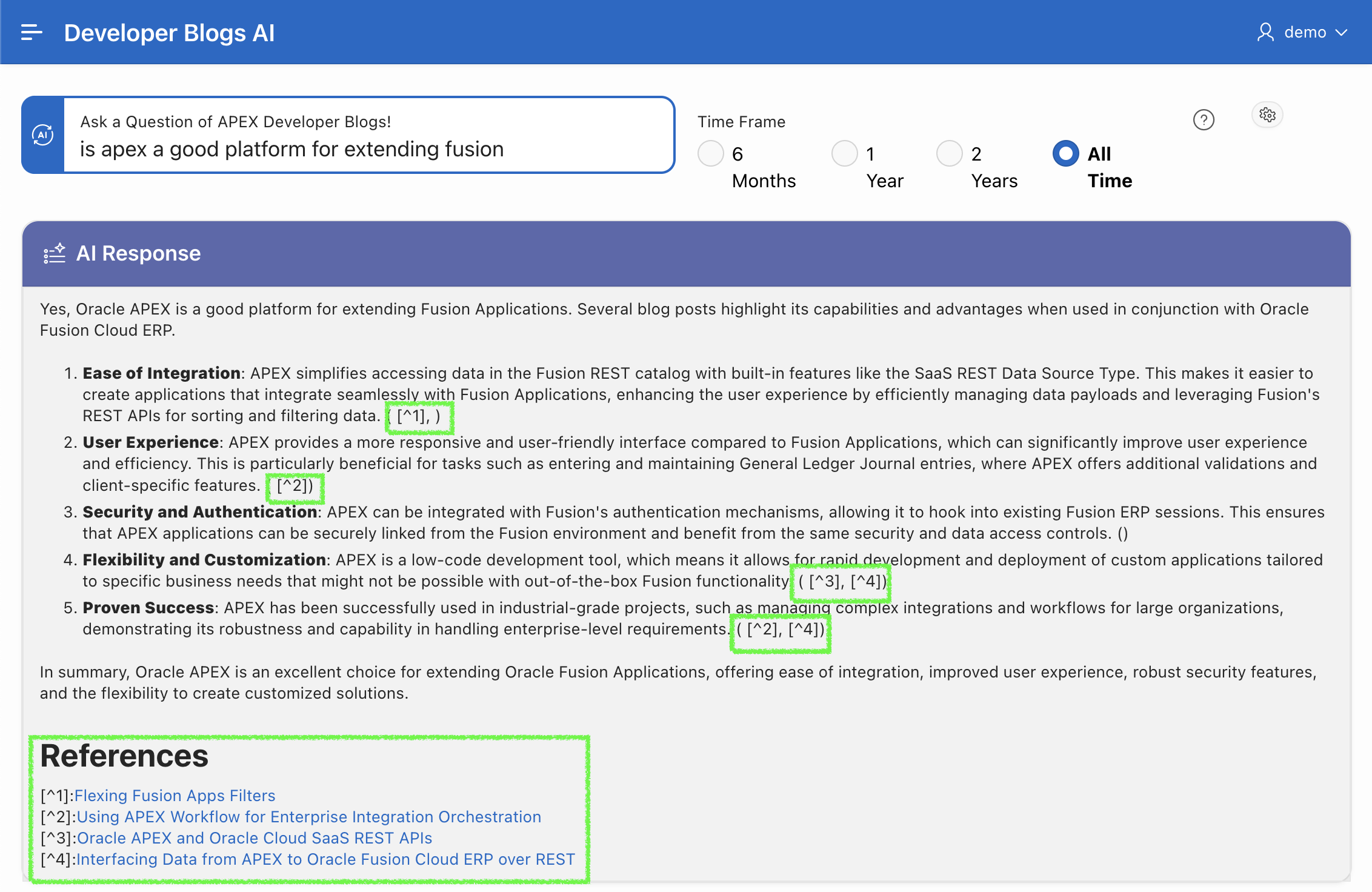
The screenshot below shows the results of a RAG-based inquiry. The items highlighted in green below are generated by the generate_references procedure above.
Conclusion
A RAG solution running in 23ai of the Oracle database allows you to augment Generative AI models with targeted data from your database. Sending only relevant data to the LLM improves the accuracy of responses, reduces hallucinations, reduces the number of tokens consumed by the LLM (and therefore cost), and can also speed up requests.